
MINECRAFT · JAVA 1.21.1
How to find your Minecraft world seed
Get the number for the world you actually play, then match the edition and generation version before opening a map.
Start in your Java world
Open the world, open chat and enter /seed. In Java 1.21.1 the response is a number, sometimes beginning with a minus sign. Copy the complete number. A seed from a video title, an old note or a friend’s world is not a substitute for the seed of the world currently loaded.
If a multiplayer server refuses the command, ask its owner or an authorized operator. A server may intentionally keep its seed private. This website cannot recover a hidden server seed from a screenshot or a list of structures, and you do not need to upload a world save to use the map.
For a server you manage, record the seed from the running world. The level-seed setting is a world-creation input; an old configuration note does not establish which existing save is loaded. Minecraft’s Java server setup guide explains that setting. Do not replace a working server world just to check its seed.
Keep the seed as text
Seeds can be longer than an ordinary calculator or spreadsheet preserves precisely. Paste the number directly into the map’s seed field. If you store a list in a spreadsheet, format the cells as text before pasting; a rounded value creates a different map.
For a simple input example, 12345 and -12345 are different seeds. Preserve the sign, do not insert commas and do not shorten the final digits. The example 12345 is the map’s demonstration input, not a recommended survival world.
This map accepts signed whole-number seeds. If you originally typed words when creating the Minecraft world, retrieve its resulting numeric seed with the game. Pasting the original phrase into this tool will show an input error.
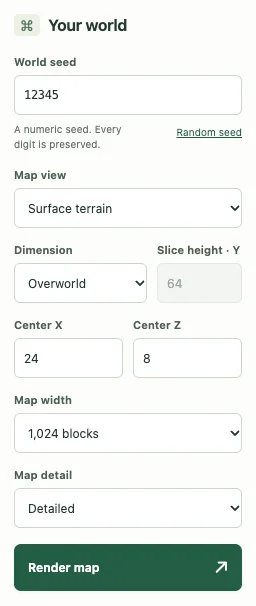
Match the world before rendering
- Confirm that the world uses default Java 1.21.1 generation. This map does not currently offer Bedrock or other versions.
- Paste the numeric seed into the seed map.
- Select the dimension and enter a useful X/Z center, such as your current base.
- Render the map and compare a broad landmark before relying on a structure result.
- Save a named view or copy its link if you want to revisit the same area.
A newly opened map starts around the world origin. The origin is not a player spawn. The optional spawn feature estimates a starting area, rather than verifying the exact block where a player will appear. If a screenshot says “at spawn,” obtain its actual coordinates instead of assuming X 0, Z 0.
If you play Bedrock or an upgraded world
Bedrock has its own world settings and seed features; the official Bedrock Seed Picker guide describes its preset workflow. A valid Bedrock seed does not make this Java finder suitable for Bedrock structure locations. Use a tool that explicitly supports your edition.
An older world can contain chunks created before the version you now launch. A matching seed with a mismatched generation version can still produce different results. Read the edition and version guide before treating that as a map defect.
What to keep in a world note
Record the seed, edition, generation version, dimension and coordinates together. “Seed 12345; Java 1.21.1; Overworld; center X 800, Z −400” is a reproducible note. “Great village seed” is not enough to reconstruct the same search.
A shared map link includes the seed. Share it only with people who should know it, particularly on a server where discovery is part of the game. Browser saves stay on that device and are not a cloud backup.
Keep exploring
All Minecraft seed guides · Map controls with screenshots · Troubleshoot a mismatch