
MINECRAFT · JAVA 1.21.1
Minecraft ruined portal finder
Find predicted ruined portals and distinguish a generated ruin from an active portal link or a route between dimensions.
Set up the search
Enter your numeric seed for a default Java 1.21.1 world. This form starts with Ruined Portal in the Overworld. Set Center X and Center Z to the area you want to search, then choose Find on map. The finder looks within 2,048 blocks of that center and orders predicted locations by horizontal distance.
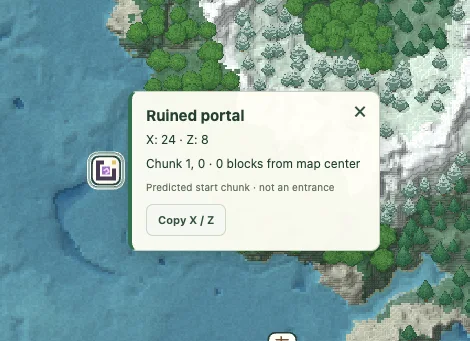
Use View to center on a result and Copy XZ to keep its horizontal coordinates. The marker identifies a predicted starting chunk. It does not identify an entrance, promise a complete structure or supply its internal layout.
Choose the dimension you want to inspect
Ruined portals can occur in the Overworld and Nether, as described in Minecraft’s ruined portal article. This page starts in the Overworld. To search the Nether, change Dimension to Nether, then select Ruined portal in the refreshed structure list.
Enter coordinates from the selected dimension. This finder does not convert an Overworld base into a matching Nether destination and does not test portal-linking rules. A ruined structure and an active travel connection are different questions.
Read a portal candidate correctly
The marker gives a predicted starting-chunk location. It does not tell you whether the frame is complete, how many replacement blocks it needs, where its chest sits or what that chest contains. Surface height is not a guarantee that every part of the ruin is exposed.
Open the result and inspect the surrounding terrain for a practical approach. Save it as a candidate, then examine the structure in the matching game before planning a route around it. A decorative purple icon is not evidence that a portal is already active.
An example that avoids mixing worlds
Suppose your note says “Nether portal near X 160, Z −80.” Before searching, clarify whether those are Nether coordinates or Overworld coordinates. Keep “Overworld ruined portal” and “Nether ruined portal” as separate saved names even if their numbers happen to resemble one another.
For the Nether option, the map opens a biome slice. The slice describes biomes at the selected height; it does not show every netherrack wall, lava pocket or route. Use the actual world to evaluate access.
Compare a ruin with your travel plan
If the purpose is exploration, a nearby ruin may simply be a point of interest. If the purpose is a transport system, record and test your actual active portals separately. This finder does not select ideal portal locations or guarantee a destination after activation.
When a prediction differs from the game, check edition, version, dimension and the generation history of the area. A player-built portal will not appear merely because it exists in your save; the map calculates generated candidates from the seed. For a Nether destination beyond the portal, use the fortress finder or bastion finder.
Check a result and keep the context
Confirm the seed, Java 1.21.1, dimension and the generation history of the target chunks. If the location matters to a long-term plan, compare it in a separate matching world before committing. A surface tree or block texture is an illustration, not a surveyed entrance.
Save a named view or copy a full map link with the seed and coordinates. For a discrepancy, include the map point and the position checked in-game using Help & troubleshooting. See the compatibility checklist when an older or modified world differs.
Game background: Minecraft’s ruined portal information.
Keep exploring
All Minecraft seed guides · Map controls with screenshots · Troubleshoot a mismatch