
JAVA 1.21.1 · EXPLORATION
A village between two temple journeys
Use the village as a chosen reference point, then compare a northbound jungle-temple trip with a longer journey toward a desert pyramid.
24680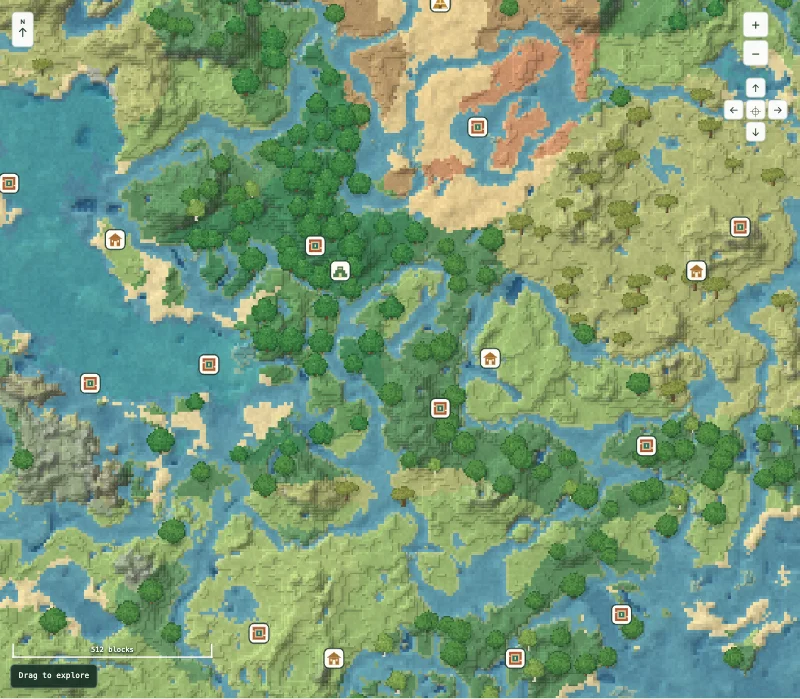
Choose one expedition at a time
The village marker is at X -168, Z 280. The jungle temple start lies almost directly north at X -152, Z -712. The small change in X makes the route easy to describe, but it says nothing about how easy the terrain is to cross.
The desert pyramid marker is farther north and east at X 104, Z -1400. If your goal is a shorter trip, inspect the jungle-temple area first. If you want a longer exploration route, compare the surrounding regions before heading toward the pyramid.
Checked places to visit
These are the centers of structure start chunks confirmed in a freshly generated official Java 1.21.1 world. A doorway, chest or underground room can lie elsewhere. X and Z alone do not tell you a safe Y height.
| Place | X | Z | Chunk X, Z | Explore |
|---|---|---|---|---|
| Village | -168 | 280 | -11, 17 | View on map |
| Jungle temple | -152 | -712 | -10, -45 | View on map |
| Desert pyramid | 104 | -1400 | 6, -88 | View on map |
| Trial chambers | 296 | 280 | 18, 17 | View on map |
Village to jungle temple is about 992 horizontal blocks. Jungle temple to desert pyramid is about 734 more. A trial chamber marker at X 296, Z 280 provides a different, underground destination east of the village.
Before you choose this world
This seed suits deliberate exploration rather than a claim that every attraction is beside spawn. The map does not show temple traps, chest contents or safe entrances. The checked structures still require normal in-game preparation.
Use default Java 1.21.1 generation with structures enabled. This article does not verify Bedrock, newer versions, mods or chunks carried over from an older world. The map center is a planning reference, not a promise about your starting spawn.
Open it in Minecraft
- Create a new Java 1.21.1 world and paste the full seed, including a minus sign if present. Leave world generation at its default settings.
- Keep the map open beside the game. Use the X/Z table to plan your route and check the local terrain before travelling.
- Save a view when you find an area you like. A shared map link preserves the location; copying just the seed does not.
For coordinate help, read coordinates and chunks. If the world differs, follow the mismatch checklist.
What was checked
Locations checked on 1 November 2026. The named structure starts were read from fully generated chunks made by the official Java 1.21.1 server. This confirms those locations in that setup; it does not verify every marker, cave, chest item or tree across the seed. The image is a capture of our map, not an in-game photograph.
Read how to interpret the map and browse more checked seed routes.